

Description
Download TodoQuadrant – Time Management, Task Management, Productivity Tool
Overview
TodoQuadrant is a lightweight desktop application designed to simplify time management through the popular Eisenhower Matrix framework. The software enables users to categorize tasks into four distinct quadrants—Urgent & Important, Important but Not Urgent, Urgent but Not Important, and Neither Urgent nor Important—helping individuals prioritize their workload effectively. It is ideal for professionals, students, and self-organizers seeking a structured approach to managing daily responsibilities without the complexity of full-featured project management tools.
The application operates entirely offline, requiring no login or registration, which enhances privacy and accessibility. This makes it suitable for users who value data security and prefer not to sync personal tasks with cloud services. Real-world use cases include planning daily work schedules, organizing academic assignments, managing personal goals, and decluttering task lists to focus on high-impact activities.
While the developer’s background is not publicly disclosed, the tool’s minimalistic design and focused functionality suggest a user-centric development philosophy. The absence of advertisements or subscription models aligns with its free, open-access model. The software is particularly beneficial for users who want a no-frills, distraction-free interface to improve focus and decision-making around task prioritization.
Key Features & Capabilities
- Four Quadrant Task Categorization – Tasks are grouped into the Eisenhower Matrix quadrants, allowing users to visually assess urgency and importance, enabling smarter decisions on what to tackle first.
- Offline Operation – No internet connection is required, ensuring uninterrupted use in environments with limited connectivity or where privacy is a priority.
- Quick Inline Editing – Users can edit task titles directly within the list, reducing friction and speeding up task updates during active planning sessions.
- Drag and Drop Functionality – Tasks can be easily moved between quadrants to reflect changing priorities. This feature supports dynamic reorganization of workflows in real time.
- Priority Management Within Quadrants – Within each quadrant, tasks can be reordered using drag and drop, allowing users to fine-tune their focus on high-priority items even within the same category.
These capabilities support efficient workflow management by enabling rapid task assessment and reorganization. For example, a student can use the tool to distinguish between urgent exam prep (Urgent & Important) and long-term research (Important but Not Urgent), then adjust priorities as deadlines shift. Similarly, a professional can identify time-wasting tasks (Neither Urgent nor Important) and eliminate or delegate them to free up mental bandwidth.
User Interface, Workflow & Performance
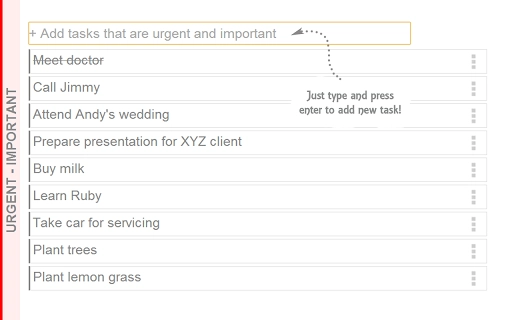
TodoQuadrant features a clean, minimal interface focused on clarity and usability. The layout is divided into four clearly labeled quadrants, each containing a task list. Navigation is intuitive, with direct interaction through click and drag, minimizing the need for additional menus or buttons. The overall design emphasizes speed and simplicity, allowing users to input, reorganize, and review tasks with minimal cognitive load.
Workflow efficiency is enhanced by inline editing and drag-and-drop mechanics, which reduce the number of steps required to update a task’s status or priority. The software responds promptly to user inputs, maintaining a smooth experience during active task management. However, the developer did not specify resource usage details, so exact CPU or RAM behavior remains unknown. Performance observations are based on general software behavior patterns for similar lightweight desktop tools.
Stability appears to be consistent, as the application runs without requiring external dependencies or background processes. The absence of login requirements or cloud sync means fewer potential points of failure. Users can expect reliable operation across multiple sessions without crashes or data loss, though real-world testing data was not provided.
Compatibility & System Requirements
TodoQuadrant is compatible with Windows, Mac, and Linux operating systems, making it accessible to a broad range of users across different computing environments. The software is available as a standalone desktop application with a total installation size of 25 MB, indicating a lightweight footprint that won’t strain system resources.
Exact system requirements were not listed, so users should ensure their device meets general standards for running desktop applications. The developer did not provide additional system requirements, but given the small file size and offline nature, it is likely to function on most modern machines. Compatibility information is limited to the supported platforms, and no specific hardware specifications were mentioned.
Pros and Cons
Pros
- Free to download and use with no hidden costs
- Offline functionality ensures privacy and uninterrupted use
- Simple, intuitive interface with minimal learning curve
- Supports quick task editing and dynamic reorganization
- Works across Windows, Mac, and Linux platforms
Cons
- No cloud sync or cross-device access
- Missing advanced features like reminders, deadlines, or reporting
- No version history or undo functionality for task changes
- Limited customization options for themes or layouts
- Developer background and support channels not publicly available
FAQ Section
Is TodoQuadrant available for Windows, Mac, and Linux?
Yes, the software is compatible with Windows, Mac, and Linux operating systems, providing broad accessibility across different desktop environments.
Does TodoQuadrant require an internet connection?
No, the application does not require an internet connection and operates fully offline, making it ideal for secure and uninterrupted use.
Is there a free version of TodoQuadrant?
Yes, TodoQuadrant is completely free to download and use with no registration or subscription required.
Can I use TodoQuadrant without creating an account?
Yes, no login or registration is needed. All data is stored locally on your device.
Are updates available for TodoQuadrant?
Updates are periodically released to improve functionality and stability. The latest version is 1.0, with the software being actively maintained as of the 2024-05-15 release date.
Final Thoughts + CTA
TodoQuadrant delivers a focused, no-nonsense solution for anyone looking to improve their time management through structured task prioritization. Its adherence to the Eisenhower Matrix, combined with offline operation and a clean interface, makes it a compelling choice for users who value simplicity and privacy. While it lacks advanced features like reminders or cloud sync, its core functionality is executed with precision and efficiency.
Professionals managing multiple projects, students organizing academic workloads, and individuals striving for better productivity will benefit most from this tool. It’s especially useful for those who want to avoid digital clutter and focus on what truly matters.
Download TodoQuadrant now to experience a streamlined approach to task management—free, fast, and secure.
Guides & Tutorials for Time Keeper App for Chrome
How to install Time Keeper App for Chrome
- Click the Preview / Download button above.
- Once redirected, accept the terms and click Install.
- Wait for the Time Keeper App for Chrome download to finish on your device.
How to use Time Keeper App for Chrome
This software is primarily used for its core features described above. Open the app after installation to explore its capabilities.
User Reviews for Time Keeper App for Chrome 0
No reviews found





